For EMT and paramedic programs · Free pilot for a term
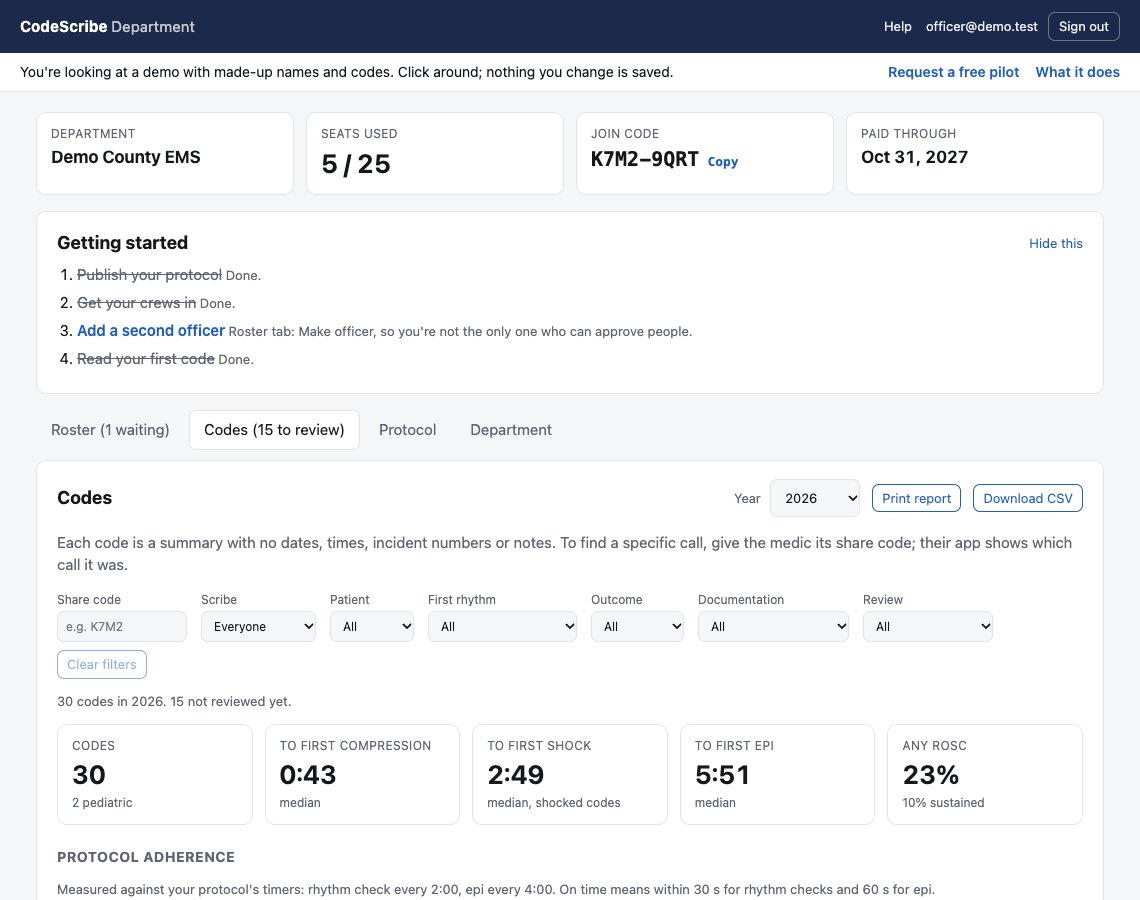
Students run CodeScribe EMS on their own phones during scenarios, the same app crews use on real arrests. Each mock code reaches your dashboard the moment it ends, with the scenario name, time to first compression, shock and epi, cycle timing against the protocol you set, CPR pauses, and what the student left undocumented.
The dashboard link opens a demo program with made-up data, no sign-in.
Students learn to scribe on the tool they'll use on the truck. What they left blank shows up on the screen in front of the class, not in a chart review weeks later.
Open any scenario and see every intervention by minute and second. Print it on one page. No more "the epi was around four minutes in."
Set the buttons, timers and drug list once. Every student's phone runs the same screen, locked if you want it locked.
Departments wait 12 to 72 hours for a summary, a privacy measure for real arrests. A training program has no patient, so each code shows up at the student's next check-in, in time for the debrief.
Students type the scenario on the record ("Scenario 3, VF with ROSC") and it comes through with the code, so you can compare everyone's run of the same scenario.
Codes scribed, how many were fully documented, and median time to first compression, for each student beside the cohort's.
Epi intervals and rhythm checks judged against the timers you set, with every CPR pause counted. Same report a department's medical director gets.
Any code prints as a timeline with its timing verdicts, ready to hand the student.
At the end of the term, remove every student in one tap. Instructors stay, the codes stay, next term's students join with the same code.
CodeScribe EMS is a documentation aid, not clinical decision support. It never tells a student what to give or when; your curriculum and your protocols do.
We set your program up as a training program and send you a join code. You join in the app first, and the same sign-in opens the dashboard.
Each student installs CodeScribe EMS, signs in once, and enters the code. About two minutes per phone. We'll walk a class through it.
A student scribes the mock code, names the scenario on the record, and it's on your dashboard before the debrief starts.
A free pilot for a term. At the end we ask what it was worth to you, and the first programs that stay on keep their starting price for three years. Priced per program per year, not per student, because cohorts turn over.
Today it's a paid download on the App Store. Ask us about program pilots; we don't want the price of the app to be the reason a class can't try it.
No. These are practice scenarios, and the summaries carry the same stripped fields a real department receives, plus the scenario name the student typed. The privacy policy covers training programs in its own paragraph.
Not yet; iPhone and iPad only. The dashboard runs in any browser. If Android is what's stopping your program, tell us.
Yes. Their records stay on their phones, the app keeps working on its own, and when they join a department that uses CodeScribe they already know it.
No. It shows what was recorded and when, against the timers you set. What that means for the student is your call.
Empty, with a short getting-started list. The demo shows a program with a term's worth of scenarios.
Something else? sasha@codescribeems.org.
We're looking for a few EMT and paramedic programs to pilot it free for a term and tell us what's missing.
 CodeScribe